Figuring out how to create an invoice as a freelancer trips up a lot of people who are otherwise great at their actual job. You can be a fantastic designer, writer, or developer and still lose money simply because your invoices look unprofessional or leave out something a client needs to actually pay you. The good news is invoicing isn’t complicated once you know what goes where — it just takes doing it right the first time so you’re not chasing payments a month later.
Most freelancers learn this the hard way, usually after a client “forgets” to pay because the invoice didn’t have clear payment terms. This guide walks through exactly what to include, so that doesn’t happen to you.
Why Your Invoice Format Actually Matters
A messy or incomplete invoice doesn’t just look unprofessional — it gives clients an easy excuse to delay payment. “I didn’t see a due date” or “there’s no invoice number for our records” are real things accounts departments say, and they’re not always making excuses. Sometimes the invoice genuinely is missing what they need.
This is where invoicing for beginners tends to go wrong. New freelancers focus so much on getting the wording of the email right that they forget the invoice itself needs to carry all the essential details on its own, without anyone needing to ask follow-up questions.
What to Include in a Freelance Invoice
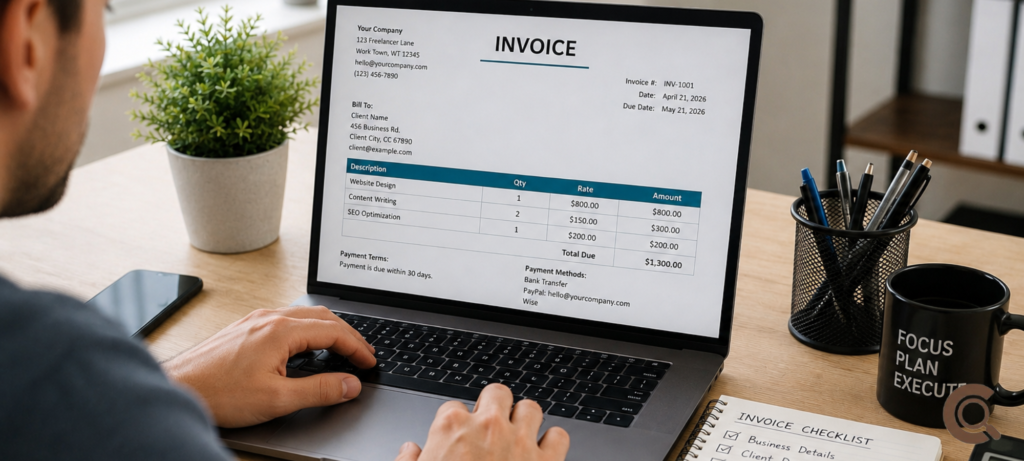
Here’s everything a solid freelance invoice example should have, no matter which tool you use to build it:
- Your name or business name, plus contact details and, if applicable, your tax ID or VAT number
- Client’s name and billing details — get this exactly right, since mismatched names cause delays with corporate clients
- A unique invoice number — this matters more than people think, since it makes tracking payments and handling taxes far easier
- Invoice date and due date — spell out the due date clearly rather than relying on vague terms
- An itemized invoice breakdown — list each service or deliverable separately with its own price rather than one lump sum
- Payment terms — Net 15, Net 30, or “due on receipt,” stated plainly
- Accepted payment methods — bank transfer, PayPal, Wise, Stripe, whatever you actually use
- Total amount due, including any applicable tax
Skipping even one of these is often enough to slow a payment down by days or weeks, especially with larger companies that route invoices through an accounts payable department rather than a single decision-maker.
How to Create an Invoice as a Freelancer: Step-by-Step
Step 1: Choose your invoicing method. You can build a freelance invoice template in Google Docs or Sheets for free, or use dedicated invoice software like FreshBooks or QuickBooks if you’re sending invoices regularly and want automatic numbering and reminders built in.
Step 2: Add your business details at the top. Name, email, and tax ID if you have one. This is also where a lot of freelancers add a small logo just to look more established, though it’s optional.
Step 3: Fill in the client’s information. Double-check spelling and billing address, especially for businesses where the invoice needs to match their internal records exactly.
Step 4: Assign an invoice number. Even something simple like INV-001, INV-002 works fine — the point is having a system, not making it complicated.
Step 5: List your services with individual line items. Avoid vague descriptions like “design work.” Instead, write “Homepage design – 1 revision round” so the client sees exactly what they’re paying for.
Step 6: Set clear payment terms and due date. This single step does more to help you get paid faster freelance than almost anything else on this list. Vague terms invite vague payment timelines.
Step 7: Send it promptly and follow up if needed. Send the invoice the same day you finish the work, not two weeks later. If payment doesn’t come through by the due date, a polite payment reminder email a few days after is completely normal — most clients expect it and won’t be offended.
Payment Terms That Actually Get You Paid Faster
The wording you choose for payment terms for freelancers matters more than most people assume. “Net 30” gives clients a full month, which can feel painfully slow when you need cash flow now. “Due on receipt” or “Net 7” tends to get money in your account noticeably faster, especially with smaller clients who don’t have a formal accounts payable process.
Adding a small late payment fee clause — even just 1.5% per month on overdue invoices — also nudges clients to pay on time, even if you rarely end up enforcing it. Just make sure it’s stated on the invoice itself, not something you mention after the fact.
If invoicing is starting to feel like just one piece of a bigger picture — managing cash flow, chasing multiple clients, figuring out what to do with money once it actually arrives — it’s worth reading our piece on how to create multiple passive income streams online once your freelance income is more predictable and you’re ready to build on top of it.
Free Tools You Can Use Right Now
If you’re just getting started, our guide on alternative cloud storage services besides Google Drive covers a few free tools worth knowing about for storing and sharing invoice records safely, especially once you’re juggling multiple clients and need things organized somewhere reliable.
For deeper guidance on invoicing standards and small business finance basics, the U.S. Small Business Administration’s guide to getting paid breaks down invoicing and cash flow fundamentals that apply whether you’re freelancing part-time or running it as a full business. QuickBooks’ invoicing resource hub is also worth a look if you want to compare invoice software options and see real invoice templates before building your own from scratch.
Common Invoicing Mistakes Freelancers Make
Forgetting to number invoices sequentially causes real headaches later, especially at tax time when you’re trying to reconcile income across a full year. Sending invoices without a clear due date is another frequent one — “please pay soon” isn’t a due date, and clients will interpret it however benefits them most.
A lot of freelancers also forget to keep copies of every invoice sent, which becomes a problem if a client disputes a payment or if you need records for self-employed taxes later. A simple spreadsheet tracking invoice number, client, amount, and payment status solves this in about ten minutes of setup.
Frequently Asked Questions
How do I create an invoice as a freelancer with no experience?
Start with a free freelance invoice template in Google Docs or invoicing software like FreshBooks. Include your details, the client’s details, an invoice number, itemized services, payment terms, and a due date — that covers everything a basic invoice needs.
What should a freelance invoice include?
A proper invoice includes your name and contact details, the client’s billing information, a unique invoice number, invoice and due dates, an itemized list of services, payment terms, accepted payment methods, and the total amount due.
How can I get paid faster as a freelancer?
Setting shorter payment terms like Net 7 or “due on receipt” instead of Net 30, sending invoices immediately after finishing work, and including a small late fee clause all help freelancers get paid faster without needing to chase clients repeatedly.
Do freelancers need invoice numbers?
Yes. Invoice numbers make it much easier to track which invoices have been paid, organize records for tax season, and resolve any payment disputes with clients quickly and clearly.
What’s the best free tool for creating invoices?
Google Docs or Google Sheets work fine for freelancers just starting out and sending only a few invoices a month. Once volume increases, dedicated invoice software like FreshBooks or QuickBooks adds automatic reminders and easier tracking.
Final Thought
Learning how to create an invoice as a freelancer isn’t about finding some perfect template — it’s about consistently including the details that actually get you paid without back-and-forth emails. Get the basics right once, save it as your go-to freelance invoice template, and reuse it for every client from then on. It’s a small habit, but it’s the difference between chasing payments every month and just getting paid on time.